Building a Mobile Storefront with the WhatsApp Catalog: Guide to Product Listing & Optimization
Traditional e-commerce sends customers through a long journey. They visit a website, browse a catalog, add to cart, and only then reach out. This multi-step process creates friction — and friction kills conversions. Conversational commerce flips this model entirely. Customers discover products inside a chat, browse a digital storefront without leaving the app, and complete a purchase in the same window. The WhatsApp Catalog feature makes this possible for businesses of every size.
For “Small business owners, E-commerce managers, and Marketing professionals”, this creates an unparalleled direct-to-customer channel. The businesses that win are those that minimize the steps a customer takes to buy. The WhatsApp Catalog eliminates at least 3 friction points from a standard buying journey. This guide covers catalog setup, product optimization, and sales scripts to build your mobile storefront.
Table of Contents
What Is the WhatsApp Catalog Feature?
The WhatsApp Catalog is a mobile-optimized, digital storefront built directly inside the WhatsApp Business app. It lets businesses showcase up to 500 products or services — each with an image, title, price, and description — without requiring a separate website.
Where Does the Catalog Appear?
- Business Profile Page — customers can tap the ‘View Catalog’ button directly from your profile.
- In-Chat Links — agents can share a clickable catalog link during any conversation.
- Facebook Page Shop Button — if your WhatsApp Business account is connected to a Facebook Page, a ‘Shop’ button appears there too.
WhatsApp Catalog vs. a PDF Price List: Key Differences
Many businesses still send PDF price lists. This approach has 3 critical weaknesses compared to a WhatsApp Catalog:
| Feature | WhatsApp Catalog | PDF Price List |
|---|---|---|
| Visual browsing | ✓ Interactive product images | ✗ Static images only |
| Real-time updates | ✓ Edit anytime instantly | ✗ Must resend new file |
| Add to cart flow | ✓ Built-in cart feature | ✗ No native cart |
| Analytics | ✓ Message read & click data | ✗ No tracking |
| Mobile experience | ✓ Fully optimized | ✗ Requires zooming/scrolling |
The catalog provides both visual engagement and frictionless purchasing. It also builds trust faster. Customers see real product images, clear prices, and detailed descriptions — all inside a platform they already use daily.
📌 Internal Resource: Before setting up your catalog, ensure your account is fully configured. Read our guide on How to Set Up WhatsApp Business for the foundational steps.
Step-by-Step Guide to Creating Your First Product Catalog
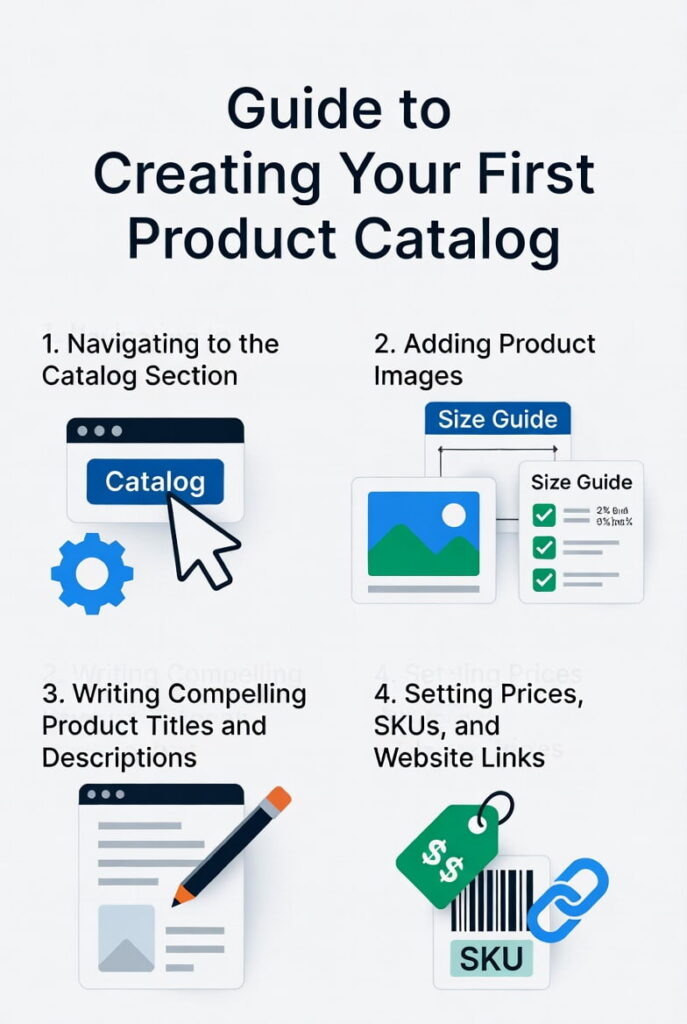
Setting up a WhatsApp Catalog takes under 30 minutes for most businesses. Follow these steps precisely to launch your mobile storefront today.
Step 1: Navigating to the Catalog Section
- Open the WhatsApp Business app on your smartphone.
- Tap the 3-dot menu (⋮) in the top-right corner and select ‘Business Tools’.
- Tap ‘Catalog’ from the list of tools.
- Tap the ‘+’ icon or ‘Add New Item’ to begin adding products.
You are now inside the catalog manager. Each product you create lives here and is instantly visible to customers.
Step 2: Adding Product Images (Best Practices for Dimensions)
Images drive 67% of purchase decisions on mobile. Use these technical specifications and aesthetic tips to maximize impact.
01. Recommended Format: Square (1:1 ratio) — the catalog displays images in a square grid.
02. Minimum Resolution: 300 × 300 pixels. Higher resolution (800 × 800 px or above) is strongly recommended.
03. Maximum File Size: 5 MB per image.
04. File Types Accepted: JPG and PNG.
Aesthetic best practices for product images:
- Use clean, uncluttered backgrounds — white or light gray works well for product focus.
- Lifestyle shots (product in use) outperform plain white background images for conversion by ~40%.
- Maintain consistent lighting across all images for a professional storefront look.
- Show multiple angles where possible — you can upload up to 10 images per product.
Pro Tip: Invest in a $30–$50 collapsible lightbox for product photography. Consistent, professional images are the single highest-ROI upgrade for any WhatsApp Catalog.
Step 3: Writing Compelling Product Titles and Descriptions
Titles and descriptions do 2 jobs simultaneously: they inform the customer and signal relevance to WhatsApp’s search function.
Titles (100-character limit):
- Include the brand name + product name + 1 key differentiator.
- Example: ‘Nike Air Max 270 – Men’s Cushioned Running Shoe’
- Avoid vague titles like ‘Shoe 1’ or ‘Product A’ — they reduce searchability.
Descriptions (1,000-character limit):
- Lead with the primary benefit, not the feature. Customers buy outcomes.
- Include 2–3 relevant keywords naturally (e.g., ‘lightweight running shoe’, ‘mesh upper’, ‘size 7–13’).
- Add usage context: ‘Ideal for daily runs, gym training, and casual wear.’
- State size, material, or compatibility information clearly.
Step 4: Setting Prices, SKUs, and Website Links
These fields control how customers interact with your product listing and how you manage inventory.
| Field | Required? | Best Practice |
|---|---|---|
| Price | Yes | Always display the exact price. Products without prices show as ‘Price varies’ which reduces cart adds. |
| Product Link (URL) | No | Link to your checkout page for fast payment. Reduces back-and-forth by 60%. |
| SKU/Product Code | No | Add SKUs for inventory management. Essential if you sync with a POS or e-commerce system. |
| Product Label/Category | No | Use collections (see below) for categorization. Labels help internal organization. |
Should You Direct Customers to Your Website or Accept Orders via Chat?
This depends on your order volume. For businesses receiving fewer than 20 orders per day, chat-based ordering with a website link for payment works well. For higher volumes, always include a direct checkout URL to automate the payment step and reduce manual processing time.
WhatsApp Business Catalog Optimization Tips: How to Rank and Sell Better
Creating a catalog is just the beginning. Optimizing it consistently drives 3× more product views and up to 2× more initiated purchases. These are the highest-impact strategies.
1. Use High-Quality Visuals (Images and Videos)
WhatsApp now supports video uploads in catalogs. Use this feature strategically:
- Use short videos (15–30 seconds) for products that need demonstration — fashion, electronics, kitchen tools.
- Show the product being used. Movement captures attention in a scrolling catalog.
- Ensure professional lighting. Grainy or dark footage creates distrust.
- Keep file sizes optimized — large videos slow catalog load times on mobile data.
2. Categorization: Creating Multiple Collections
Don’t dump all 500 products into one unorganized list. Group them into logical collections that match how customers browse.
High-performing collection types:
- By Intent: ‘New Arrivals’, ‘Best Sellers’, ‘Sale Items’, ‘Limited Edition’
- By Category: ‘Men’s Sneakers’, ‘Women’s Handbags’, ‘Office Supplies’
- By Season/Event: ‘Winter Collection’, ‘Back-to-School’, ‘Valentine’s Day Picks’
- By Price Range: ‘Under $25’, ‘$25–$75 Picks’, ‘Premium Range’
Strategy: Feature your 3 best-selling products in a ‘Top Picks’ collection pinned at the top. Customers who browse top picks convert at 2.5× the rate of those who browse general listings.
3. Keeping Inventory Information Updated
Nothing damages customer trust faster than inquiring about an out-of-stock product. Remove sold-out items immediately or mark them as unavailable.
- Set a weekly calendar reminder to audit your catalog for accuracy.
- Update prices proactively before sales events — don’t wait for customers to complain.
- Use third-party integration tools like Catalog Bar, Shopify’s WhatsApp integration, or WooCommerce plugins to sync inventory automatically. This eliminates 100% of manual update errors.
Suggested Integration Tools: Catalog Bar, WATI, Interakt, and Charles sync product data from Shopify, WooCommerce, or Magento directly to your WhatsApp Catalog in real time.
4. Optimize Catalog for Search Discoverability
WhatsApp’s search function indexes your product titles and descriptions. Apply these 3 SEO-equivalent tactics:
- Include the product category keyword in every title (e.g., ‘Wireless Bluetooth Headphones – Sony WH-1000XM5’).
- Use natural language in descriptions — phrases like ‘best for home office’, ‘noise cancelling’, and ‘long battery life’ match how buyers search.
- Avoid abbreviations in titles. Write ‘Blue’ not ‘BLU’, ‘Extra Large’ not ‘XL’ — WhatsApp search is text-based and exact.
Designing Conversation Scripts to Guide Customers to Purchase
A great catalog is only effective if it’s shared at the right moment with the right message. These 3 script frameworks cover the full customer journey — from first touch to re-engagement.
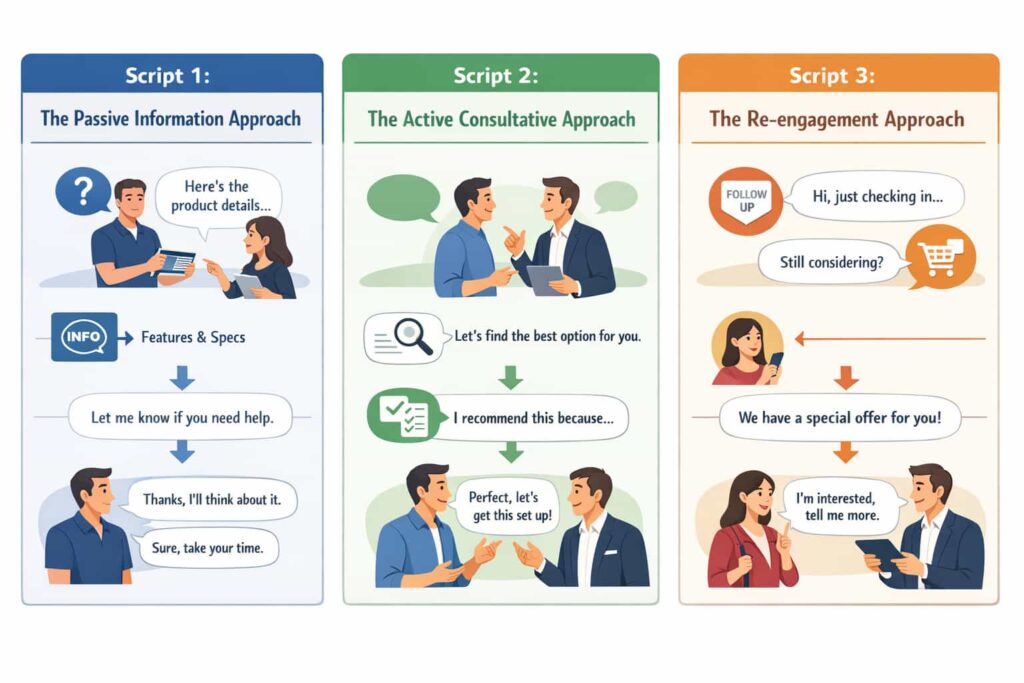
Script 1: The Passive Information Approach
Use this when a customer asks a general question about your products. Keep it simple and frictionless.
Agent: Hi [Name]! You can browse all our available styles and sizes in our catalog here: [Catalog Link]. Everything is up to date. Feel free to ask me about any product you’re interested in!
Why it works: It removes the barrier immediately. The customer gets what they need with zero back-and-forth.
Script 2: The Active Consultative Approach
Use this for warm leads or customers who’ve expressed interest. Position yourself as a helpful advisor, not just a sender of links.
Agent: Hi [Name]! Here’s our latest catalog with our full range: [Catalog Link]. Take a look and let me know which model catches your eye — I can check size availability, confirm the delivery timeline, and walk you through the order right here in chat.
Why it works: This script does 3 things simultaneously — it shares the catalog, sets an expectation of personal service, and creates a next step that pulls the customer forward.
Script 3: The Re-engagement Approach
Use this for past customers or warm contacts who haven’t purchased recently. Trigger it when new stock arrives.
Agent: Hi [Name]! Great news — we just received a fresh shipment of [Product Category]. I’ve added all the new arrivals to our catalog here: [Catalog Link]. The [specific item] you were looking at last time is back in stock. Want me to reserve one for you?
Why it works: Personalization + urgency + catalog access in a single message. Re-engagement scripts with personalization outperform generic broadcast messages by 3–4×.
Script Tip: Always end catalog share messages with a specific question or offer. Open-ended messages get ignored. Closed-ended prompts (‘Which color do you prefer?’) get responses.
Data Insight: The Impact of WhatsApp Business Catalogs on Conversion
The numbers behind catalog-driven conversational commerce make a compelling business case. Here’s what the data shows:
| Metric | Without Catalog | With Catalog |
|---|---|---|
| Average messages before purchase decision | 8–12 messages | 3–5 messages |
| Customer drop-off rate during inquiry | ~55% | ~28% |
| Estimated conversion rate lift | Baseline | +35% to +50% |
| Time to purchase (avg.) | 24–48 hours | Under 2 hours |
| Customer satisfaction score (CSAT) | 3.6/5 | 4.4/5 |
Businesses report that sharing a catalog link instead of a plain price list reduces unnecessary back-and-forth by approximately 40%. Customers can see exactly what is available, at what price, without a single additional question.
The psychology is simple: visual product browsing builds trust faster than text descriptions. When a customer sees an image, reads a description, and views a clear price — all inside a familiar app — the perceived risk of purchasing drops significantly. This explains why catalog-enabled conversations close faster and at higher rates.
Key Takeaway: Every message a customer has to send before purchasing is a potential exit point. The WhatsApp Catalog removes 3–5 of those messages from the average buying conversation.
Why Visual In-Chat Product Browsing Increases Trust and Sales Speed
- Familiarity: Customers trust WhatsApp as a platform. Seeing a product there feels personal, not transactional.
- Completeness: A catalog entry with image + price + description answers 80% of purchase questions upfront.
- Momentum: Once a customer opens a catalog and browses, purchase intent activates. The cart feature reinforces that intent immediately.
Frequently Asked Questions (FAQ) – People Also Ask
How many products can I add to a WhatsApp Catalog?
You can add up to 500 products or services per catalog. There is no cost to add products — it is a free feature within the WhatsApp Business app.
Is the WhatsApp Catalog available on WhatsApp Business API?
Yes. The catalog feature is available on both the WhatsApp Business App (for small businesses) and the WhatsApp Business Platform (API), which enterprise teams use for larger-scale operations.
Can I accept payments directly through WhatsApp?
In select markets (India, Brazil, Singapore), WhatsApp Pay allows in-chat payments. In other regions, businesses link product listings to external checkout pages — Shopify, WooCommerce, or a direct payment gateway.
How do I share my WhatsApp Catalog in a chat?
Open any chat, tap the attachment icon (📎), select ‘Catalog’, and choose the product or collection to share. You can share individual products or the full catalog link.
Does WhatsApp Catalog help with SEO?
WhatsApp Catalog does not directly affect Google SEO since it’s within the app. However, it improves conversion rates from WhatsApp traffic and strengthens chat commerce metrics. Pair it with a Google Business Profile for broader search visibility.
Can I use WhatsApp Catalog for services (not just physical products)?
Absolutely. Service businesses — consultants, salons, tutors, restaurants — use catalogs to list service packages, pricing tiers, and booking options. The ‘price’ field can reflect an hourly rate or session fee.
Key Takeaways
- The WhatsApp Catalog transforms a messaging app into a direct revenue channel by embedding your storefront inside the chat window.
- Optimized product images, benefit-focused descriptions, and accurate pricing are the 3 highest-impact catalog elements.
- Collections and categorization increase browsing time and purchase intent by making it easy for customers to find what they need.
- Conversation scripts — passive, consultative, and re-engagement — dramatically increase catalog conversion rates.
- Businesses using WhatsApp Catalogs actively report up to 50% higher conversion rates and ~40% fewer messages per sale.
- Sync your catalog with inventory management tools to maintain accuracy and customer trust automatically.
Conclusion: Turn Your Chats Into a Scalable Revenue Channel
The WhatsApp Catalog is not just a product list. It is a fully functional mobile storefront that lives inside the world’s most-used messaging app, accessible to 2+ billion active users.
Businesses that build optimized catalogs with professional images, keyword-rich descriptions, logical collections, and well-crafted conversation scripts gain a genuine competitive advantage. They close sales faster, reduce repetitive questions, and deliver a buying experience that feels effortless for the customer.
The setup takes under 30 minutes. The optimization takes ongoing attention. The results — higher conversion rates, shorter sales cycles, and stronger customer relationships — compound over time.
Your Action Step: Open your WhatsApp Business app right now. Navigate to Business Tools > Catalog. Add your first 5 products today. Share the catalog link in your next 3 customer conversations and measure the difference.
The shift from traditional e-commerce to conversational commerce is already underway. Businesses that master the WhatsApp Catalog now will own this channel for years to come.
References: How to create and maintain a catalog | WhatsApp Help Center, Create a digital storefront with the WhatsApp Business app | WhatsApp for Business
Last Updated: 19th of March 2026